> ## Documentation Index
> Fetch the complete documentation index at: https://revenueflo.com/docs/llms.txt
> Use this file to discover all available pages before exploring further.
# Flutter SDK
> Instructions to setup in-app offer paywall in iOS app **(Flutter)**
Before proceeding with this guide, create a free account on the [RevenueFlo Platform](https://app.revenueflo.com/) and set up your first project and offer campaign to manage dynamic offer paywall seamlessly.
## Requirements
Xcode 13.0+ and iOS 15.0+ or later.
## Installation
* Go to your RevenueFlo project dashboard.
* Select the **Settings** from sidebar.
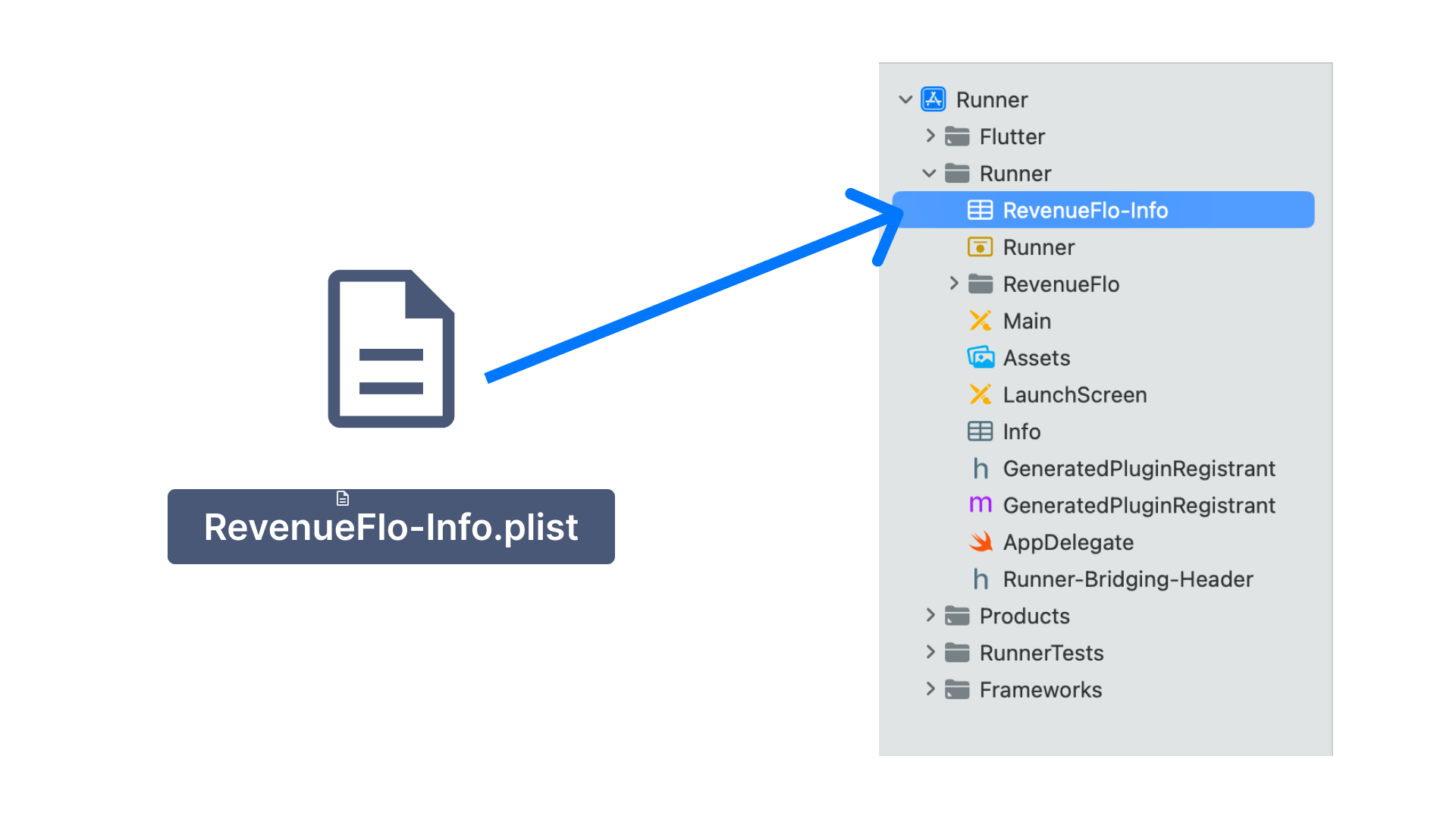
* Select **SDK & Code Setup → Flutter** and **Download RevenueFlo-Info.plist**
* Copy the **RevenueFlo-Info.plist** file you just downloaded into the root of your Xcode project inside the **Runner** folder and add it to all targets.
 * [Download RevenueFlo SDK](https://revenueflo.com/downloads/SDK/RevenueFloFlutterSDK.zip)
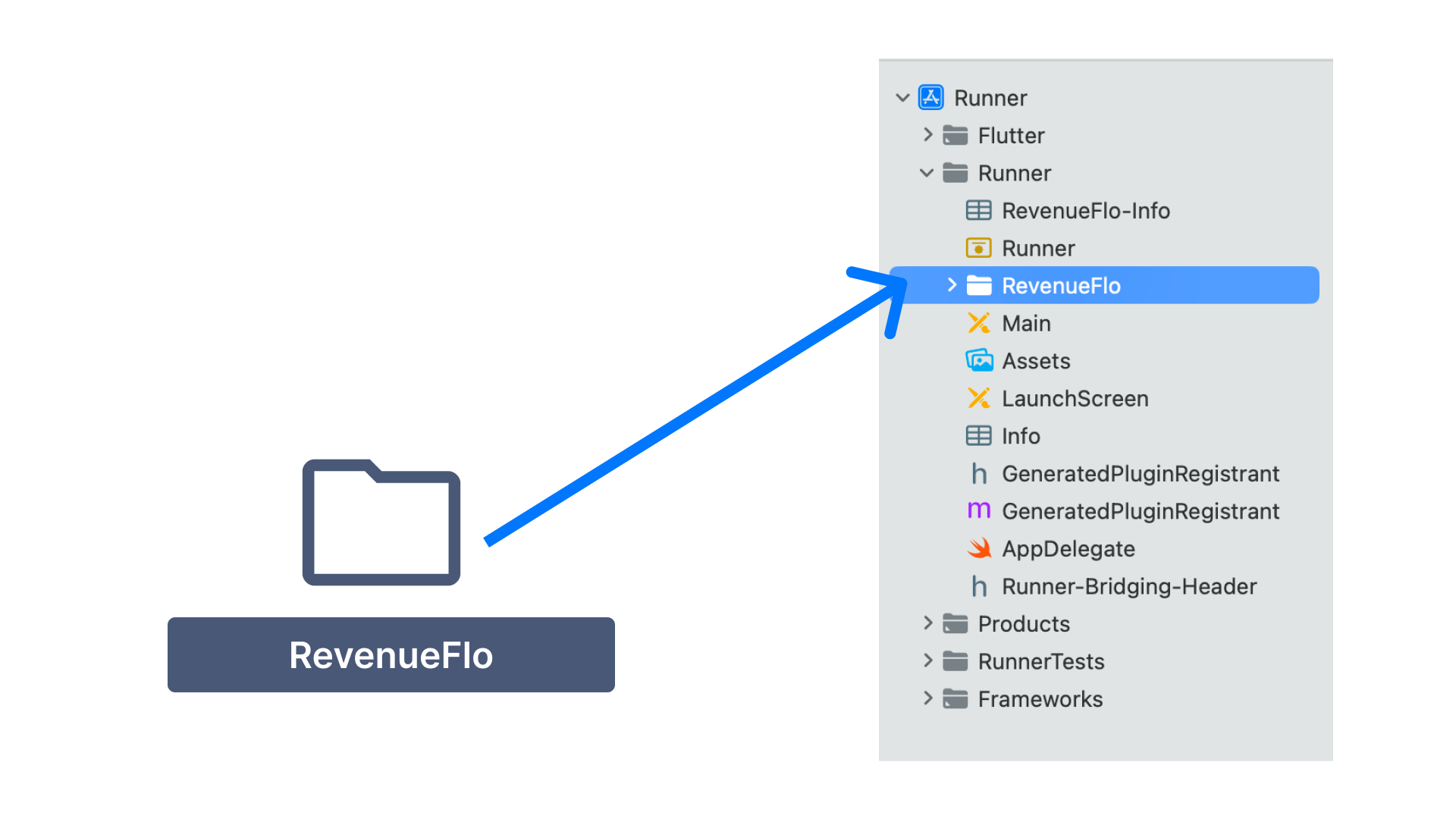
* Unzip & Copy the **RevenueFlo** folder from the SDK you just downloaded into the root of your Xcode project inside the **Runner** folder and add it to all targets.
* [Download RevenueFlo SDK](https://revenueflo.com/downloads/SDK/RevenueFloFlutterSDK.zip)
* Unzip & Copy the **RevenueFlo** folder from the SDK you just downloaded into the root of your Xcode project inside the **Runner** folder and add it to all targets.
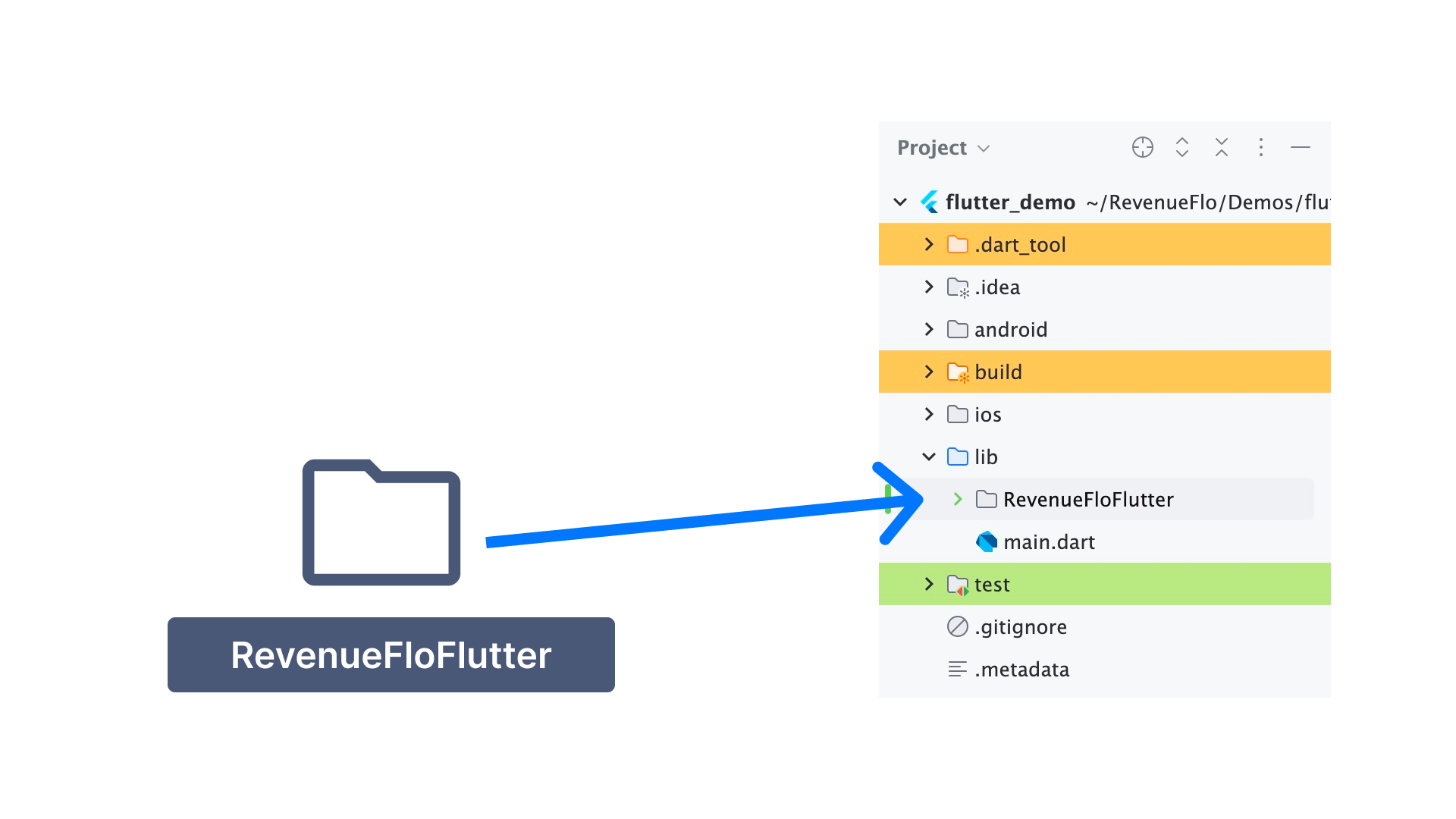
 * Copy the **RevenueFloFlutter** folder from the SDK you just downloaded into your **Flutter** project inside the **lib** Folder.
 First, you need to configure the Xcode project so that the SDK can use **Apple's App Attest API** to ensure that requests sent from your app come from legitimate instances of your app.
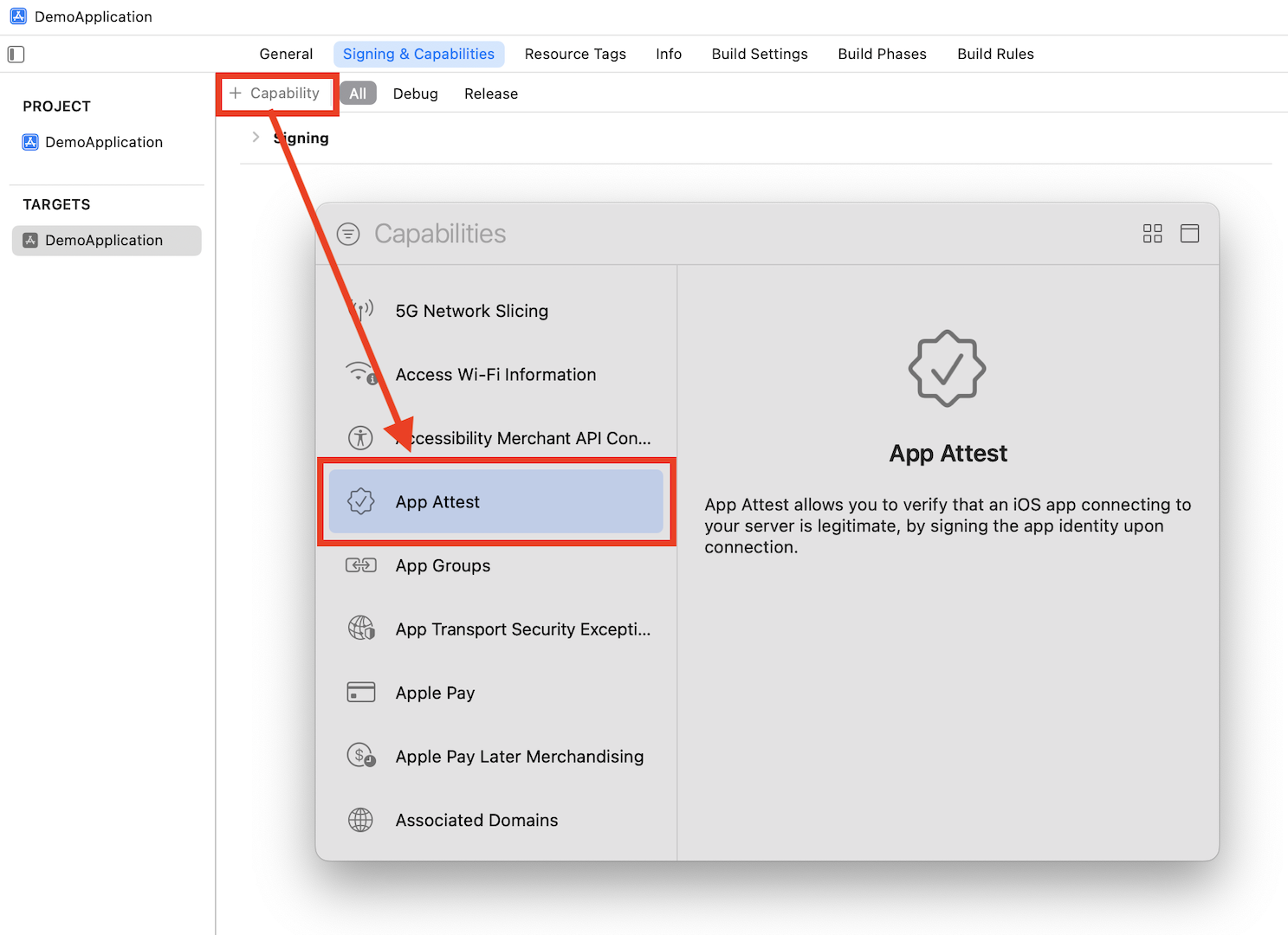
1. Add the App Attest capability for your app target.
First, you need to configure the Xcode project so that the SDK can use **Apple's App Attest API** to ensure that requests sent from your app come from legitimate instances of your app.
1. Add the App Attest capability for your app target.
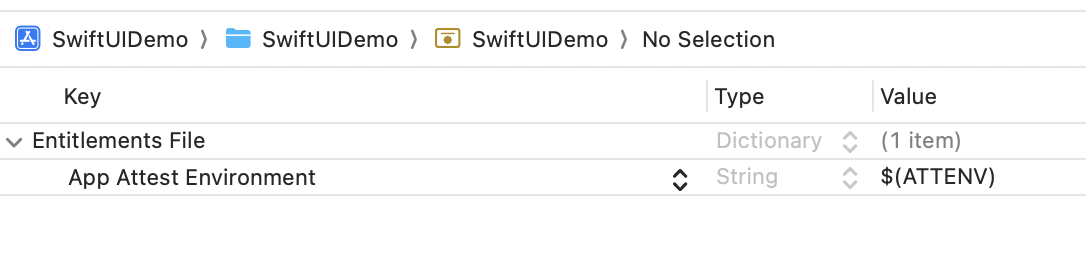
 2. Open the **.entitlements** file in your Xcode project and set the App Attest Environment value to `$(ATTENV)`
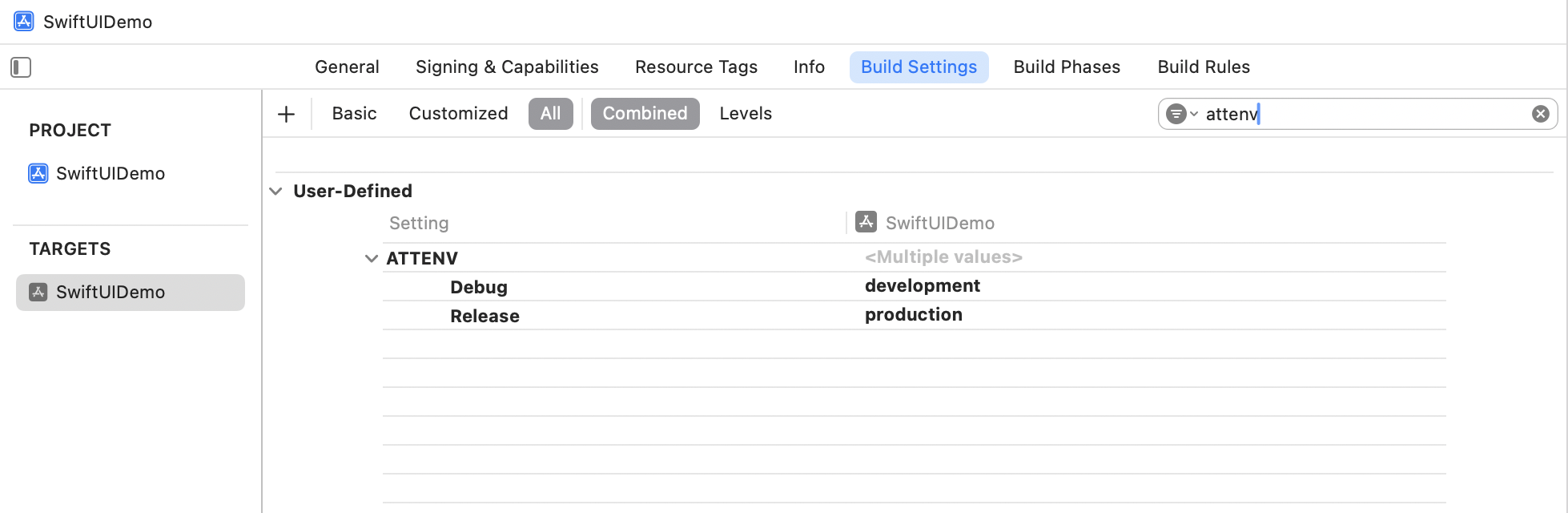
 3. In Xcode's Target Build Settings, create a user-defined setting named `ATTENV` and set its value to `production` for Release and `development` for Debug.
 ## Import the SDK Code
In your application delegate, add the following lines at the beginning of `application:didFinishLaunchingWithOptions:` and other functions.
```swift Swift icon="swift" theme={null}
import Flutter
import UIKit
@main
@objc class AppDelegate: FlutterAppDelegate {
override func application(
_ application: UIApplication, didFinishLaunchingWithOptions launchOptions: [UIApplication
.LaunchOptionsKey: Any]?
) -> Bool {
// Setup RevenueFlo
setupRevenueFloSDK()
GeneratedPluginRegistrant.register(with: self)
return super.application(
application, didFinishLaunchingWithOptions: launchOptions)
}
// Copy from here
private func setupRevenueFloSDK() {
let controller = window?.rootViewController as! FlutterViewController
let channel = FlutterMethodChannel(
name: "com.revenueflo.swift.sdk/native",
binaryMessenger: controller.binaryMessenger)
RevenueFlo.shared.setFlutterChannel(channel)
channel.setMethodCallHandler { [weak self] (call, result) in
if call.method == "configureRevenueFlo" {
// Call the configure function in RevenueFlo.shared
self?.configureRevenueFlo(result: result)
} else if call.method == "presentOffer" {
self?.presentOffer(
args: call.arguments as? [String: Any], result: result)
} else {
result(FlutterMethodNotImplemented)
}
}
}
private func configureRevenueFlo(result: @escaping FlutterResult) {
RevenueFlo.configure()
RevenueFlo.shared.fetchOfferCampaigns()
result("RevenueFlo configured successfully!")
}
private func presentOffer(
args: [String: Any]?, result: @escaping FlutterResult
) {
let delay = args?["delay"] as? Double ?? 0.0
DispatchQueue.main.async {
guard let rootViewController = self.window?.rootViewController
else {
result(
FlutterError(
code: "NO_ROOT_VIEW_CONTROLLER",
message: "Root view controller not found.",
details: nil))
return
}
RevenueFlo.shared.presentOfferInFlutter(
from: rootViewController, delay: delay, completion: result)
result("RevenueFlo offer presented successfully!")
}
}
// Copy till this
}
```
## Present an In-app Offer
Configure RevenueFlo in **lib/main.dart** and call `presentOffer()` from your widget to seamlessly present exclusive offers to your users. Ensure to configure the offer details in the campaign dashboard before invoking.
```dart Flutter icon="flutter" theme={null}
// update the main function
Future main() async {
WidgetsFlutterBinding.ensureInitialized();
if(Platform.isIOS) {
await RevenueFloFlutter.configure();
}
runApp(const MyApp());
}
// declare the Revenueflo offer function
void presentRevenuefloOffer({double delay = 0.0}) {
RevenueFloFlutter.presentOffer();
RevenueFloFlutter.setDelegateListeners(
onOfferDidPresent: (offer) {
debugPrint("Offer Presented: \$offer");
},
onOfferDidClose: (offer) {
debugPrint("Offer Closed: \$offer");
},
onOfferPrimaryButtonDidClick: (offer) {
debugPrint("Primary Button Clicked: \$offer");
},
);
}
// Invoke on button press or in any screen's Widget build(BuildContext context)
// Set up your UI
// Set 5 secs delay if you're invoking on app launch.
// presentRevenuefloOffer(delay: 5.0);
OutlinedButton(onPressed: () {
// Call the SDK method to seamlessly present an exclusive offer from the Revenueflo.
if (Platform.isIOS) {
presentRevenuefloOffer();
}
},
child: const Text("Show Offer")),
```
Make sure you have at least one campaign active in RevenueFlo and test on a real device to experience your offer paywall exactly as your users will see it.
## Example In-app Offer
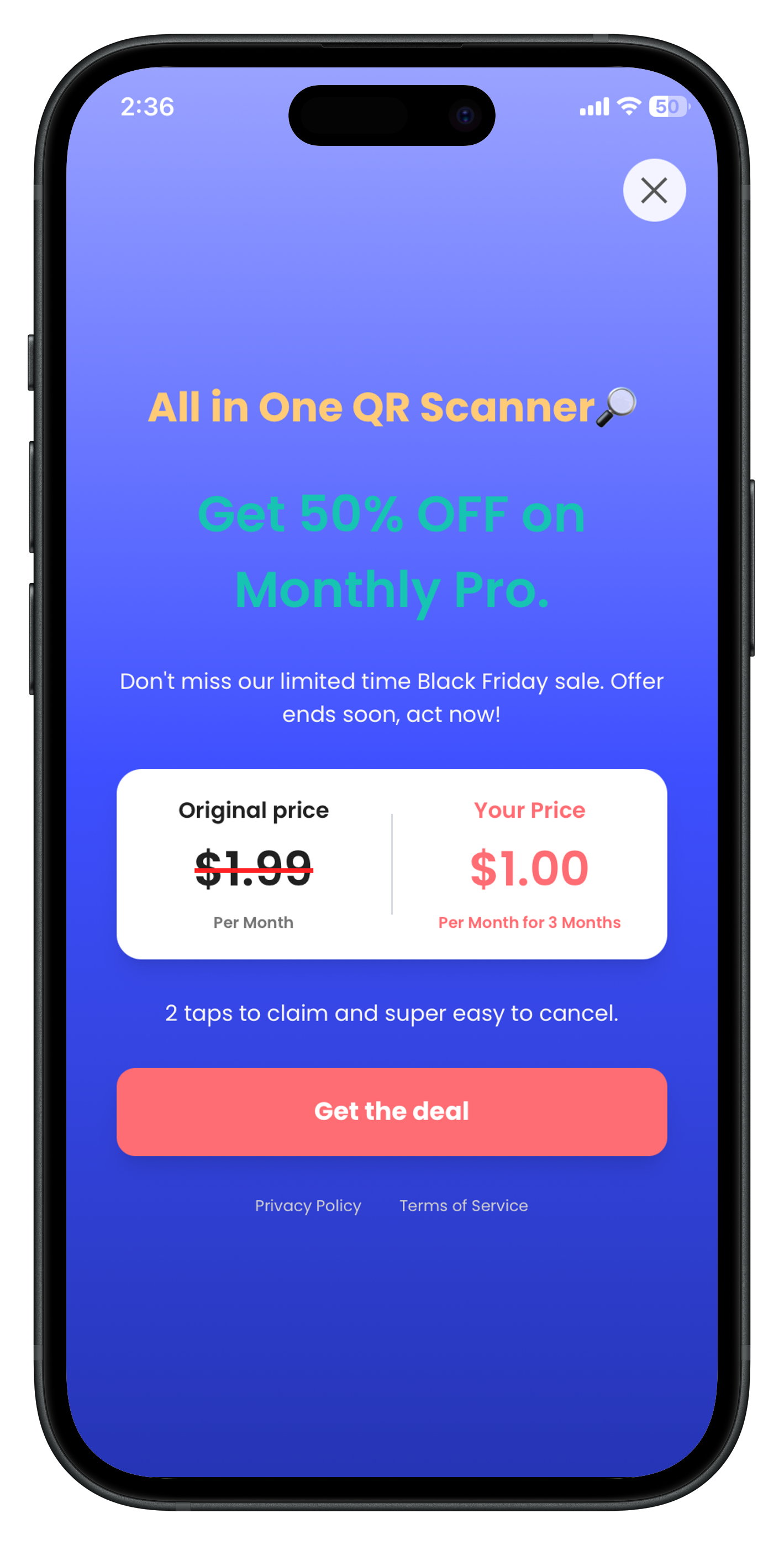
Here's the final presented offer paywall from **RevenueFlo**.
## Import the SDK Code
In your application delegate, add the following lines at the beginning of `application:didFinishLaunchingWithOptions:` and other functions.
```swift Swift icon="swift" theme={null}
import Flutter
import UIKit
@main
@objc class AppDelegate: FlutterAppDelegate {
override func application(
_ application: UIApplication, didFinishLaunchingWithOptions launchOptions: [UIApplication
.LaunchOptionsKey: Any]?
) -> Bool {
// Setup RevenueFlo
setupRevenueFloSDK()
GeneratedPluginRegistrant.register(with: self)
return super.application(
application, didFinishLaunchingWithOptions: launchOptions)
}
// Copy from here
private func setupRevenueFloSDK() {
let controller = window?.rootViewController as! FlutterViewController
let channel = FlutterMethodChannel(
name: "com.revenueflo.swift.sdk/native",
binaryMessenger: controller.binaryMessenger)
RevenueFlo.shared.setFlutterChannel(channel)
channel.setMethodCallHandler { [weak self] (call, result) in
if call.method == "configureRevenueFlo" {
// Call the configure function in RevenueFlo.shared
self?.configureRevenueFlo(result: result)
} else if call.method == "presentOffer" {
self?.presentOffer(
args: call.arguments as? [String: Any], result: result)
} else {
result(FlutterMethodNotImplemented)
}
}
}
private func configureRevenueFlo(result: @escaping FlutterResult) {
RevenueFlo.configure()
RevenueFlo.shared.fetchOfferCampaigns()
result("RevenueFlo configured successfully!")
}
private func presentOffer(
args: [String: Any]?, result: @escaping FlutterResult
) {
let delay = args?["delay"] as? Double ?? 0.0
DispatchQueue.main.async {
guard let rootViewController = self.window?.rootViewController
else {
result(
FlutterError(
code: "NO_ROOT_VIEW_CONTROLLER",
message: "Root view controller not found.",
details: nil))
return
}
RevenueFlo.shared.presentOfferInFlutter(
from: rootViewController, delay: delay, completion: result)
result("RevenueFlo offer presented successfully!")
}
}
// Copy till this
}
```
## Present an In-app Offer
Configure RevenueFlo in **lib/main.dart** and call `presentOffer()` from your widget to seamlessly present exclusive offers to your users. Ensure to configure the offer details in the campaign dashboard before invoking.
```dart Flutter icon="flutter" theme={null}
// update the main function
Future main() async {
WidgetsFlutterBinding.ensureInitialized();
if(Platform.isIOS) {
await RevenueFloFlutter.configure();
}
runApp(const MyApp());
}
// declare the Revenueflo offer function
void presentRevenuefloOffer({double delay = 0.0}) {
RevenueFloFlutter.presentOffer();
RevenueFloFlutter.setDelegateListeners(
onOfferDidPresent: (offer) {
debugPrint("Offer Presented: \$offer");
},
onOfferDidClose: (offer) {
debugPrint("Offer Closed: \$offer");
},
onOfferPrimaryButtonDidClick: (offer) {
debugPrint("Primary Button Clicked: \$offer");
},
);
}
// Invoke on button press or in any screen's Widget build(BuildContext context)
// Set up your UI
// Set 5 secs delay if you're invoking on app launch.
// presentRevenuefloOffer(delay: 5.0);
OutlinedButton(onPressed: () {
// Call the SDK method to seamlessly present an exclusive offer from the Revenueflo.
if (Platform.isIOS) {
presentRevenuefloOffer();
}
},
child: const Text("Show Offer")),
```
Make sure you have at least one campaign active in RevenueFlo and test on a real device to experience your offer paywall exactly as your users will see it.
## Example In-app Offer
Here's the final presented offer paywall from **RevenueFlo**.